

Ah! I’ve you’ve somehow happened across this post, you’re likely a soul on the hunt for a mysterious driver for an even more mysterious card.
Look no further, as I hope that the author’s own forging into this path may be assistance to you. Come, Atlantean technical expertise should set light on this matter…
Okay, so down to business. I’ll keep it short as it’s a pointer, not a tutorial. Then I’ll explain anything afterwards.
You likely bought a funny looking, but lifesaving PCIe card off of Amazon or some other retailer. It had a Gigabit ethernet jack and some USB ports (either USB A 3.0 or USB-C), and would fit into a PCI Express (PCIe) 1x slot.
You also happen to be looking for a driver for it in this modern day and age.
It might’ve looked something like this:
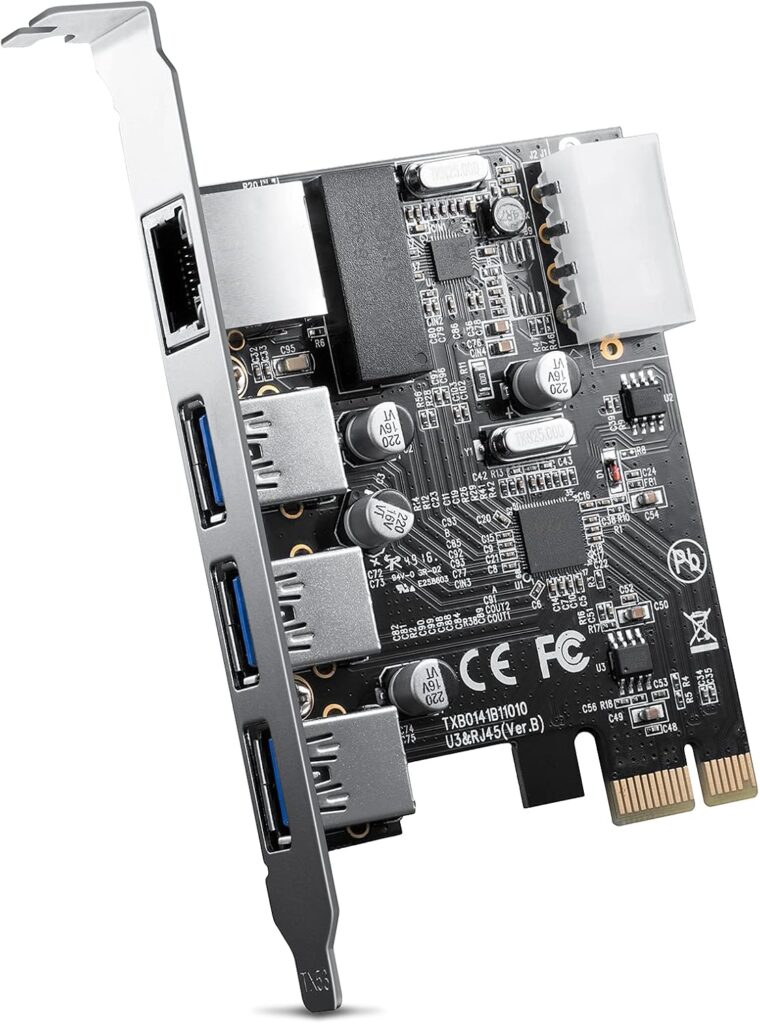
Is this your culprit? Good, carry on to checkpoint B.
WARNING
This would usually be put at the bottom, but I am placing a warning in case you see this, giddily jump to download then rageface when it doesn’t work (I can’t believe I actually wrote that). This is a “generic” card as far as I can tell. It showed up in multiple storefronts under different names. In theory it should work on other things, but it’s not tried-and-true guarantee.
This only is guaranteed to the brands listed, IDSonix and ORICO. If it works on yours outside the spec envelope, buy yourself a pizza. If it didn’t and now the PC tower’s on fire, I’m not responsible for whatever happens on the other end.
You have been warned.
This driver works for the following:
- iDsonix USB PCI-E Card, PCI-Express 2Gbps RJ45 LAN Network Adapter, 1 Gigabit Ethernet & 3 USB 3.0 Internal Expansion Card, SATA Power Desktop PCs Converter for Windows XP/Vista/7/8/10,Linux, ect
- USB3.0+ network combination card (PNU-3A1R)
Drivers included are listed for Windows XP, Vista, 7 and 10.
There are two folders for XP and 7×64. The 7×64 folder should suit all your needs for Vista, 7 and 10.
You can download the driver here. I have a mirror in case the link ever goes down.
Now that you have the drivers to your hopefully working PCIe card, let’s spit out an after-report.
This card is almost a Plug & Play card. Almost.
There are a few instances when you actually need drivers to get this card working. Things like the lack of a stable Internet connection. insertion into an older OS, or the mixture of the both. Guess which path I took?
I already had a USB 3.0 mini-card in my Dell Inspiron 530 desktop, but my primary ethernet port got fried during a lightning strike in 2022. So a new card had to be replaced. Not wanting to pull out the 3.0 or any other card in the system, this popped up in my feed when looking around. It had good reviews, fit in my 1x slot and in theory should do the job.
It did. No fanfare, not hassle.
It must be said, that particular system was running Windows 10. Even when it didn’t have Internet, it was current with 2022 updates and likely had the correct drivers in its library. Installation was straightforward.
Which brings us to this spring of 2026.
That same Inspiron was being put out to pasture, so to speak (I’ll edit and stub whenever I do a write-up on its saga). This included wiping its Windows 10 install, which it’d been running on for almost 11 years. The system was bogging down regardless, and the 4GB of RAM wasn’t helping.
I went down to Vista, which originally came down with the machine. The reinstall was smooth hard drives squeaky clean and the system looked to be in order; until I tried to get it to do updates.
It was seeing this network card, but it was an unrecognized device. I started throwing random drivers off the Dell Page and the Intel chipset. No joy. So I tried to go back into my purchase history to see if the company had drivers.
Sure enough they’d poofed to the dinosaur age, with no more web presence and all their products listed as “Unavailable”. That was a dead end. Searching just found limited stock or other vendors selling the product overseas, but nothing helpful regarding tech support or drivers.
I actually did take a moment to reverse image search the Amazon listing. I found some more results, but namely one company that had it in its catalog. They also no longer sold the product, but that same card was in a “family” of other cards listed in the support section on their site. And that’s where I had a break.
In that product’s stub, they list to lookup two part numbers to get the driver. This implies that that family of cards run with the same firmware at least. Searching high and low you wouldn’t find the PNU-3A1R card, but I did find PNU-2A1C.
It didn’t help that the directions to find the driver are also images on the manufacturer site. This completely hides your search effort while trying to find the correct files.
And that is the driver that got recognized upon install, and didn’t let a $25 part go to waste.
With all that red tape, I hope that my trouble is your ease. It’s a good thing that circumstances allowed me to dig this up now, otherwise it may have been lost completely.